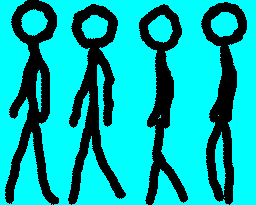
Animated movies are just a succession of still pictures. If the rate of presentation is fast enough, the brain creates an illusion of continuity.
With pygame, we use the double buffering mode (set by the option DOUBLEBUF in the call to pygame.display.set_mode()) to draw the next image in a backbuffer while the current one is in the front buffer (see fdigure below). It is only when we call pygame.display.flip() that the image in th backbuffer is sent to the front buffer, which will then be displayed at the next screen refresh.
General cycle of a stimulus presentation on a computer monitor with double buffering. The graphics card (graphics processing unit = GPU) processes a new drawing command from the application. The images are then rendered by the GPU and stored in a double buffering process. (A) In a first step, the new image is rendered into an invisible back buffer. The old image is still stored in the front buffer and displayed on the monitor. (B) In a second step, the back and front buffers are swapped. (C) In a third step, the monitor reads out and displays the content of the front buffer while a new image can already be rendered to the backbuffer (Ref: Poth, Christian H., Rebecca M. Foerster, Christian Behler, Ulrich Schwanecke, Werner X. Schneider, and Mario Botsch. 2018. “Ultrahigh Temporal Resolution of Visual Presentation Using Gaming Monitors and G-Sync.” Behavior Research Methods 50 (1): 26–38. https://doi.org/10.3758/s13428-017-1003-6.)
To avoid tearing, the swap between the backbuffer and frontbuffer mut be synchronized with the vertical refresh of the screen, to avoid seeing and overlap between the two buffers on the screen. This is called V-sync and should be enable in your video driver properties to prevent tearing.
Programming an animation will follow the following temporal logic:
#draw picture1 in the backbuffer#flip the backbuffer to front buffer, which will be displayed to screen#draw picture2 in the backbuffer#wait for some time#flip the backbuffer to front buffer#draw picture3 in the backbuffer#wait for some time#flip the backbuffer to front buffer...
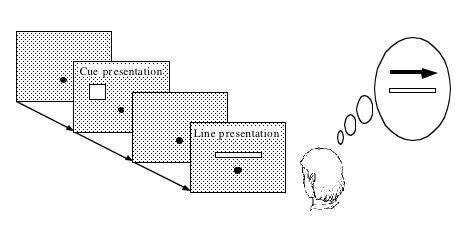
Illusory line motion (ILM) refers to a situation in which flashing a light at one end of a bar prior to the bar’s instantaneous presentation results in the percept of motion.
Exercise (*): Program the stimulus, that is, first draw a square, wait for a few milliseconds using the function pygame.time.wait(), then draw a rectangle overlapping with the initial square.
Do you feel that the moving square’s x position coincides with the flashing square or not? If you want to read about the Flash-lag illusion.
Exercise:
Create a movie of a square moving horizontally, back and forth. The
principle is simple: you just need to create a loop where you
display a square at coordinates x, y ,wait a few milliseconds, then clear
the screen, and increment or decrement the x coordinate by a fixed amount.
This strategy is explained in details at http://programarcadegames.com/index.php?lang=en&chapter=introduction_to_animation
(Optional exercise for advanced students: add blurring to the disks to make a stimulus similar to that of the wikipedia page Lilac Chaser. Then, for a solution, check out visual-illusions/lilac_chaser_blurred.py)